

Workflow Automation Software: Streamline Operations, Boost Efficiency with AI-Driven Workflows
Estimated reading time: 10 minutes
Key Takeaways
- Workflow automation software is essential for modern businesses to overcome challenges, streamline operations, and boost efficiency.
- AI-driven workflows transform enterprises by adding intelligence, predictive analytics, smart decision-making, and adaptive optimization.
- Businesses can choose between cloud-based solutions (scalable, accessible, lower upfront cost) and on-premise solutions (full control, enhanced security for sensitive data).
- Selecting the right software requires considering integration, scalability, user-friendliness, security, vendor support, cost, and industry fit.
- Embracing AI-driven automation leads to reduced errors, increased agility, and a strong competitive advantage in the rapidly evolving market.
Table of contents
- Workflow Automation Software: Streamline Operations, Boost Efficiency with AI-Driven Workflows
- Key Takeaways
- Understanding Workflow Automation Software
- The Unrivaled Benefits: Why Automate Your Workflows?
- The AI Revolution: Powering Next-Gen Workflows
- Deployment Options: On-Premise vs. Cloud-Based Solutions for Autonomous Agents
- Selecting the Right Workflow Automation Software for Your Enterprise
- Conclusion: The Future is Automated, AI-Driven, and Efficient
- Frequently Asked Questions
In today’s fast-moving business world, companies face big challenges. There’s a lot of competition, customers want things faster and better, and businesses need to be able to change quickly. Manual ways of doing things, like filling out paper forms or copying information by hand, just don’t work anymore. They cause delays, mistakes, and waste a lot of time and money.
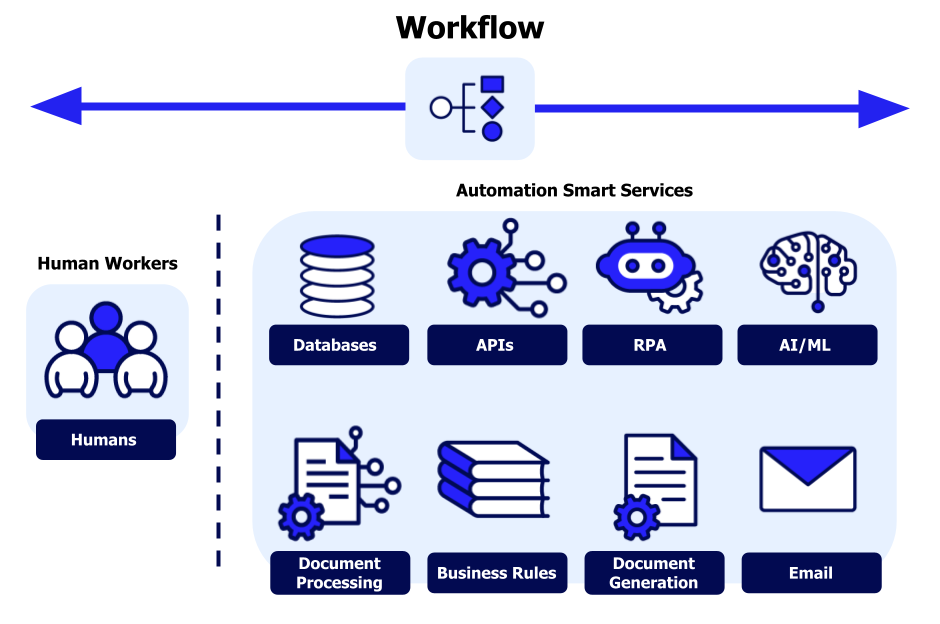
This is where workflow automation software comes in. It’s a special kind of tool that helps businesses work much smarter. It’s not just about doing one small task automatically. Instead, it helps to manage many steps in a business process across different teams and computer systems. Think of it as a helpful guide that makes sure every step happens smoothly and correctly.
With workflow automation software, businesses can truly streamline their operations with workflow automation. This means they can get things done much faster and with fewer problems. It helps organizations to greatly boost efficiency, cut down on mistakes in repetitive tasks, and stay strong in competitive markets. It also makes sure things like Robotic Process Automation (RPA) and business process management are running well.
Get ready to see how amazing AI-driven workflows are. These smart systems are the newest step in making businesses run perfectly. They are already transforming modern enterprises by adding intelligence and the ability to learn to automated tasks. This helps systems not just follow rules, but also to think and adapt.
Understanding Workflow Automation Software
Let’s look closer at what workflow automation software actually is. It’s a clever type of technology designed to automate and manage all sorts of business tasks. This can be anything from simple, repeated jobs to very complicated processes that involve many people, different computer systems, and lots of information.
The main job of this software is to help companies set up, run, and keep an eye on a series of tasks. These tasks follow certain rules, logic, and triggers. Imagine a flowchart where each step is automatic and goes to the right place. This structured approach helps manage operations, improve processes, and makes sure work flows smoothly.
Here are some important things this software can do:
- Process Modeling and Design: This feature lets people draw out their workflows like a map. They can show each step, where decisions need to be made, and who needs to approve things.
- Task Orchestration: The software automatically sends tasks to the correct person or computer system at just the right moment. No more waiting around for someone to pass a file!
- Integration Capabilities: It can connect different computer systems that a company uses. For example, it can link customer records (CRM), planning tools (ERP), human resources (HRIS), accounting software, and databases. This makes sure information flows smoothly and tasks get done across all platforms. https://sukoonkepal.com/ai-agents-enterprise-integration
- Rule-Based Execution: It automatically takes action when certain conditions are met. For instance, if an invoice is over a certain amount, the software can automatically send it to a manager for approval.
- Data Capture and Management: It automatically collects, checks, and stores information as it moves through a process. This keeps all your data neat and accurate.
- Monitoring and Reporting: You can see what’s happening with any process in real-time. This helps you spot problems or slow parts and understand how well things are working.
- Notification and Alerting: It can automatically send messages to people at important points in a process or when certain things happen.
In short, workflow automation software effectively orchestrates tasks, data, and people to improve processes. It removes manual steps, reduces delays, and makes sure every task is done the same way each time. This leads to more predictable results and makes operations work much faster and better together.
The Unrivaled Benefits: Why Automate Your Workflows?
Using workflow automation software brings many great advantages to a business. The biggest goal is to streamline your operations with workflow automation, making everything run more smoothly and effectively.
Boost Efficiency
Automation changes how quickly work gets done. By taking over tasks that are done again and again, it makes processes finish much faster. This frees up employees from boring, low-value work. They can then spend their time on more important things, like solving big problems, planning new ideas, and being creative.
This change greatly reduces manual effort. It means customers get responses faster, approvals happen more quickly, and projects finish sooner. Automation also makes sure that all your resources – people, money, and technology – are used in the best way. It stops wasted time and unnecessary steps, leading to more output and better overall productivity.
Reduce Errors
People make mistakes, especially when they have to deal with lots of information or follow many complex steps. This is a natural part of manual work. Workflow automation software helps by taking human actions out of these tricky areas. This means it minimizes mistakes.
Automated systems follow rules exactly and consistently. This makes sure that your data is always accurate and correct, from when it’s first entered until the very end. Having accurate data is super important for things like following rules, making financial reports, and keeping customers happy. By building in checks and balances, the software helps companies ensure compliance with laws and their own rules, lowering risks.
Stay Competitive
In today’s fast world, businesses need to be able to change and come up with new ideas very quickly. By streamlining operations, companies gain a big advantage: they become more agile. Faster processes mean new products can be launched sooner, customer service is quicker to respond, and businesses can change their plans more easily. This helps them adapt faster to changes in the market, what customers want, and what competitors are doing.
When a company frees up resources and spends less on daily tasks, it can invest more in creating new things, training its employees, and making customers happy. This helps new ideas grow. Being able to respond to market changes quickly puts a company ahead of others who are still stuck with old, slow ways of working. This helps them secure a stronger place in the market and grow steadily.
The AI Revolution: Powering Next-Gen Workflows
Artificial Intelligence (AI) is changing workflow automation in a huge way. It’s taking it from simple rule-following to smart, adaptable, and even predicting what might happen next. These AI-driven workflows go far beyond older automation. They add smart capabilities that make processes much more clever and strong.
This new way of working is truly transforming modern enterprises. It adds layers of intelligence that allow computer systems to learn, change, and make better decisions all by themselves.
Here’s how AI makes automation even better:
- Predictive Analytics: AI computer programs can look at past information to find patterns. Then, they can guess what might happen next or spot problems before they occur. In workflows, this means they can see future delays, figure out what resources will be needed, or predict how customers might act. This helps businesses change their processes before problems even start. For example, an AI system could predict that many customers will call about a new sale and automatically get more customer service people ready.
- Smart Decision-Making: AI allows workflows to make complex and smart choices, not just simple “if this, then that” rules. Machine Learning (ML) models can look at many different things to suggest the best way forward. They can even approve requests, like loan applications, or decide which tasks are most important based on how big their impact is. This means less need for people to oversee every small, complicated decision.
- Natural Language Processing (NLP): NLP is a special part of AI that helps computers understand, figure out, and even create human language. This is a game-changer for tasks that involve information that isn’t neatly organized, like emails, customer feedback, or legal papers. NLP can automatically pull out key information, put documents into categories, send questions to the right department, or even write replies. This greatly automates things like sorting customer support tickets or reviewing documents.
- Adaptive Process Optimization: Old ways of automating tasks were often fixed. But AI makes things flexible! By constantly learning, AI can watch how processes are working, find slow parts, or see when things go off track. Then, it can suggest or even automatically make changes to the workflow itself. This means processes can improve themselves in real-time as new information comes in or as situations change. It ensures everything runs as smoothly and quickly as possible without someone having to manually change the settings.
Deployment Options: On-Premise vs. Cloud-Based Solutions for Autonomous Agents
When a company decides to use workflow automation, one big choice they have to make is whether to use an “on-premise” or “cloud-based” system. This is especially true when they are thinking about adding autonomous agents. These are like smart computer programs (bots) that can do tasks on their own within a workflow. This choice affects costs, how secure things are, how much the system can grow, and how flexible operations can be.
Cloud-Based Workflow Automation (in the cloud)
Cloud-based solutions are like renting space on a computer system run by another company. You access it using the internet.
Advantages:
- Scalability: Cloud systems are super flexible. You can easily get more or fewer computer resources very quickly, depending on what you need. You don’t have to buy expensive new computer parts. This is great for cloud-based autonomous agents. They can be easily scaled and managed across distributed teams, using the cloud’s flexible nature to handle busy times or grow operations all over the world.
- Accessibility from Anywhere (“in the cloud”): Both people and autonomous agents can use the system from any place that has internet. This helps people work from home and teams work together across different countries.
- Lower Upfront Costs: Cloud platforms usually work like a subscription service (SaaS). This means you don’t have to pay a lot of money at the very beginning for hardware and setup.
- Easier Maintenance: The company that provides the cloud service takes care of all the computer system updates, fixes, and security. This means less work for your own IT team.
- Rapid Deployment: Cloud systems can be set up and ready to use much faster than on-premise systems. This means you start seeing benefits sooner.
Things to think about: You need a good internet connection. Also, you might worry about where your data is stored and how secure the provider’s system is.
On-Premise Workflow Automation
On-premise solutions are installed and run on a company’s own computers and systems, right inside their own building or data center.
Advantages:
- Full Control over Data and Infrastructure: Companies have complete ownership and control over their own data, servers, and network. This is really important for information that is very private or for certain rules about where data must be kept.
- Enhanced Security for Highly Sensitive Information: If a company deals with secret, private, or highly regulated data, on-premise systems allow for custom security measures, special firewalls, and direct supervision. This can often be better than what standard cloud services offer. On-premise autonomous agents benefit from this local, very controlled environment, fitting well with existing internal systems.
- Regulatory Compliance: Some businesses, like those in banking or healthcare, have strict rules. They might prefer on-premise solutions because it gives them total control over data handling and checking.
- Integration with Existing Internal Systems: It’s often easier and more direct to connect on-premise systems with older computer systems or special programs that are also hosted in the company’s own data center. This can reduce problems with different systems working together.
Things to think about: You’ll need to pay a lot of money upfront for hardware and software. There are ongoing costs for IT staff, electricity, and cooling. Setting it up takes longer, and it can be harder to grow the system or access it from far away.
Making the Choice: Guiding Factors
When deciding between on-premise vs. cloud-based autonomous agents, companies should think about these things to find the best fit for their needs:
- Budget: Do you prefer paying a subscription (cloud, like renting) or a large upfront cost (on-premise, like buying)?
- Security Requirements: How sensitive is your data? Do you need absolute control, or can you trust a good cloud provider’s security?
- Scalability Needs: How much do you expect your business to grow? Will your workload change a lot?
- Existing Infrastructure: What computer systems do you already have? How well will the new solution fit in?
- Regulatory Compliance: Are there special laws in your industry about where data must be located and how it’s handled?
- IT Staffing: Do you have enough people on your IT team to manage and maintain your own computer systems?
Selecting the Right Workflow Automation Software for Your Enterprise
Choosing the best workflow automation software is a big decision. It can really change how efficient your company is and how well you compete. There isn’t one perfect solution for everyone. You need to carefully look at what your business needs to make sure you pick the right one. The right choice will truly help streamline your operations and deliver all the promised benefits.
Here’s helpful advice on how to pick the best solution, looking at important things:
- Integration Capabilities: This is super important. The software must connect easily with all your other company systems, like those for customer management (CRM), business planning (ERP), and human resources (HRIS). Look for strong ways to connect (APIs), pre-built connectors, and support for common ways systems talk to each other. If it doesn’t connect well, the automation won’t work as effectively.
- Scalability: The software needs to be able to grow as your business grows. Can it handle more tasks, more users, and more complex workflows without slowing down?
- User-Friendliness and Adoption: Software that is easy to use and has simple tools (low-code/no-code) helps people in your business learn it faster. It lets them design and manage workflows without needing lots of help from IT experts. If software is too complicated, people won’t want to use it.
- Security Features: Since workflow automation deals with important business information, strong security is a must. Check for things like data encryption (making data secret), access controls (who can see what), audit trails (records of who did what), and if it follows security rules (like GDPR or HIPAA).
- Vendor Support and Service Level Agreements (SLAs): Look into how good the company that makes the software is. How quickly do they respond? How good is their technical help and training? Do they promise a certain amount of uptime (how long the system is running)? A good partnership with the vendor is key for long-term success.
- Cost-Effectiveness (Total Cost of Ownership – TCO): Don’t just look at the initial price. Think about all the costs: setting it up, training, connecting it to other systems, ongoing maintenance, future updates, and any hidden fees. Compare the money you expect to gain from it (ROI) against the Total Cost of Ownership – TCO to make a smart financial decision.
- Specific Industry/Use Case Fit: Some software is made for certain types of businesses (like healthcare or finance) or common tasks (like hiring new staff or processing invoices). See if the software has special features or templates that fit your exact needs.
- Reporting and Analytics: Can the software show you how your workflows are performing? Can it help you find bottlenecks (slow points) and enable continuous improvement by avoiding automation mistakes for small business and creating useful reports? This is vital for making things better all the time and showing that the software is worth the investment.
Conclusion: The Future is Automated, AI-Driven, and Efficient
It’s clear that to be a great business today, you need workflow automation software. This technology isn’t just nice to have; it’s essential for modern enterprises to succeed in a digital and competitive world.
The way automation is changing is greatly boosted by AI. AI-driven workflows are a big leap forward. They make systems smart, able to adapt, and even able to guess what will happen next. This intelligence is so important for companies to truly boost efficiency by fixing themselves, to reduce errors to almost zero with smart checks, and to strongly stay competitive by being super quick and ready for anything the market throws at them.
Embracing these technologies means more than just putting your old paper processes onto a computer. It means thinking in new ways about how work gets done. It means giving your employees smart tools and discovering new ways to be productive and creative. Companies that wisely invest in strong workflow automation, especially with AI, are not just trying to survive. They are setting themselves up to grow steadily and be leaders in the changing business world. The future truly is automated, AI-driven, and perfectly efficient.
Frequently Asked Questions
- What is workflow automation software?
Workflow automation software is a tool designed to automate and manage business tasks and processes. It streamlines operations by orchestrating tasks, data, and people according to predefined rules, logic, and triggers, reducing manual effort and improving efficiency.
- How does AI enhance workflow automation?
AI-driven workflows go beyond basic automation by adding intelligence. AI capabilities like predictive analytics, smart decision-making, natural language processing (NLP), and adaptive process optimization enable systems to learn, adapt, make complex choices, and continuously improve processes in real-time, leading to greater efficiency and accuracy.
- What are the main considerations when choosing between cloud-based and on-premise solutions for autonomous agents?
Key considerations include budget (subscription vs. upfront cost), security requirements (level of control needed for sensitive data), scalability needs (how much growth and workload fluctuation to expect), existing infrastructure compatibility, regulatory compliance, and the availability of IT staff for maintenance and management.